How to run Trivy scans on your selfhosted Forgejo code repositories?
I have wanted for a long time to integrate container scanning and SAST into my CI/CD pipeline which is a combination for Forjego Actions and Komodo Procedures. I want to identify security flaws, such as vulnerable dependencies or risky code patterns, before they ever reach deployment.
I am not a profesionnal developper and I have recently started vibe-coding a few apps. Knowing the risks of trusting AI-generated code, the goal was at the very least to check that I am not deploying something obviously vulnerable.
In an enterprise setting, I would advertise container scanning and SAST scan by talking about the "shift-left" approach: catching issues during the build process rather than after deployment, significantly reduces the cost and complexity of remediation while preventing potential breaches. The "shift-left" approach ensures that security is a continuous part of the development lifecycle rather than an afterthought. Of course, none of this apply to my homelab lol.
Ok, now that I have convinced you that it's either super-necessary or totally overkill let's configure a container image and vulnerability scanner. I ended up configuring Trivy (Aquasec), it seemed like a reasonable option as it can be selfhosted. I could have chosen Grype (by Anchore) but I had not heard about it in an enterprise setting before starting this project... I know this is not a true benchmark but this is me playing with my homelab, not me securing a business-critical application.


How does Trivy even work?
Let's see what Trivy can do ! Trivy provides different scan-types: repository scan (trivy repo), filesystem scan (trivy fs), root filesystem (trivy rootfs), and container images (trivy image). Virtual Machine Image (trivy vm) and Kubernetes (trivy k8s) scans are still experimental, I will not be covering these.
trivy repo is designed to scan code repositories, and it is intended to be used for scanning local/remote repositories in your machine or in your CI environment. Therefore, unlike container /VM image scanning, it targets lock files such as package-lock.json and does not target artifacts like JAR files, binary files, etc. Source
trivy fs is similar to trivy repo.Trivy provides two distinct modes for scanning a repository fs and repo. Both commands provide similar results on a repository they are not intended to be used at the same stage of the development lifecycle. The filesystem scan does not work with remote URLs arguments and only works when given a path. See this GitHub Issue about Trivy. The repository scan is intended to be used as a pre-build in the CICD. The filesystem scan can be either used on the developper's PC before commiting to a git repository or post build to scan part of a filesystem.
trivy rootfs is for special use cases such as scanning a host machine, scanning a root file system or scanning unpacked container image filesystem.
- When scanning unpacked container filesystem trivy works in the same way as when scanning containers images.
- Scanning a root file system can be useful for special use-cases where we want to incorporate Trivy scans inside the build process, inside the Dockerfile. Usually we setup Trivy inside a CICD Action (GitHub Action, Forgejo Action) and it fails when a scan detect vulnerabilities. When you embedd Trivy in the Dockerfile, the build does not even finish if it contains vulnerabilities. it would look like this (source):
$ cat Dockerfile
FROM alpine:3.7

RUN apk add curl \
    && curl -sfL https://raw.githubusercontent.com/aquasecurity/trivy/main/contrib/install.sh | sh -s -- -b /usr/local/bin \
    && trivy rootfs --exit-code 1 --no-progress /

$ docker build -t vulnerable-image .
trivy image scans the files inside container images for vulnerabilities, secrets, licenses... It is a regular container image scan.
I should remind you that while Trivy is evolving into a SAST tool, it is not yet as "deep" as specialized SAST giants like SonarQube, Snyk Code, or Checkmarx. Trivy is great at identifying dangerous functions calls (e.g., using md5 instead of sha256), but it may not always trace a user's input from the API all the way to the Database as accurately as a dedicated SAST tool. Trivy will propably not detect user input sanitization issues.
In the following sections, I will setup trivy repo and trivy image scans as Forgejo Actions.
How to (briefly) setup a selfhosted Forgejo instance with Runners?
I am using a self-hosted Forgejo instance. I have already configured a runner with DinD and will not cover this setup. However, here is some documentation and my Docker compose file.
There are some security issues with my setup if you don't trust Trivy as a company. Theoretically, Trivy container can take control of my DinD docker socket. However this was a trade-off I was willing to make to improve network restriction within the cicd-net network. Implementing TLS on the DinD docker socket mitigates the issue, I was lazy.
#######################
# 🦎 CICD COMPOSE 🦎 #
#######################


services:
  forgejo:
    image: codeberg.org/forgejo/forgejo:14.0.2@sha256:fa8ce5aba7c20e106c649e00da1f568e8f39c58f1706bcf4f6921f16aaf5ba48
    restart: unless-stopped
    environment:
      - USER_UID=1000
      - USER_GID=1000
      - TZ=${TZ}
      - FORGEJO__database__DB_TYPE=postgres
      - FORGEJO__database__HOST=postgres-forgejo:5432
      - FORGEJO__database__NAME=forgejo
      - FORGEJO__database__USER=forgejo
      - FORGEJO__database__PASSWD=${S_FORGEJO_DATABASE_PASSWORD}
      - FORGEJO__service__ENABLE_INTERNAL_SIGNIN=false # Disable local accounts --> Force SSO
    volumes:
      - $BASE_PATH/forgejo:/data
    #ports:
    #  - '3000:3000'
    #  - '222:22'
    depends_on: # Requires postgres-forgejo
      postgres-forgejo:
        condition: service_healthy
    networks:
      - cicd-net
      - public-net
    # Maps Komodo hostname to IP of caddy for Forgejo to call komodo webhooks
    extra_hosts:
      - "komodo.internal.valentinvie.fr:${IP_UNRAID}"

  postgres-forgejo:
    image: postgres:17.5@sha256:aadf2c0696f5ef357aa7a68da995137f0cf17bad0bf6e1f17de06ae5c769b302
    restart: unless-stopped
    #ports:
    #  - '5432:5432'
    environment:
      - POSTGRES_DB=forgejo
      - POSTGRES_USER=forgejo
      - POSTGRES_PASSWORD=${S_FORGEJO_DATABASE_PASSWORD}
    volumes:
      # replace the left-hand side from the ':' with your own path
      - $BASE_PATH/postgres-forgejo:/var/lib/postgresql/data
    healthcheck:
      interval: 30s
      retries: 5
      start_period: 20s
      test:
        - CMD-SHELL
        - pg_isready -d $${POSTGRES_DB} -U $${POSTGRES_USER}
      timeout: 5s
    networks:
      - cicd-net

# All dind containers will be also added to cicd-net !!! SECURITY ISSUE
# The runner config found in $BASE_PATH/forgejo/runner/config.yaml specifies all containers
# created in dind use host networking --> meaning the network of dind will be used.
# This means all dind container can also access dind:2375 and take control of dind
# docker socket.

  dind: # Docker in Docker managed by the runner
    image: docker:29.2.1-dind@sha256:8bcbad4b45f0bff9d3e809d85a7ac589390f0be8acbc526850c998c35c1243fd
    container_name: forgejo-dind
    privileged: true
    restart: unless-stopped
    command: ["dockerd", "-H", "tcp://0.0.0.0:2375", "--tls=false"] # Any one on the cicd-net can control the dind
    networks:
      - cicd-net

  runner:
    image: code.forgejo.org/forgejo/runner:12.6.4@sha256:2b65f3ba4345026d66de34dc8eddabb7b0f64c0e14905193ae81746f2728caa0
    depends_on:
      dind:
        condition: service_started
    container_name: forgejo-runner
    user: 1000:1000 # replace this with the UUID:GUID of the user you want to run the runner as
    environment:
      # This allows the runner to communicate with the DinD daemon
      DOCKER_HOST: tcp://dind:2375
    volumes:
      - $BASE_PATH/forgejo/runner/data:/data
      - $BASE_PATH/forgejo/runner/config.yaml:/config.yaml
    restart: unless-stopped
    # Command for registration
    #command: '/bin/sh -c "while : ; do sleep 1 ; done ;"'
    command: '/bin/sh -c "sleep 5; forgejo-runner daemon --config /config.yaml"'
    networks:
      - cicd-net

networks:
  cicd-net:
    external: true
  public-net: # reverse-proxied
    external: true
Documentation on how to setup the runner:

Documentation on why you should use DinD to run Forgejo Actions:

How to setup Trivy scans as Forgejo Actions?
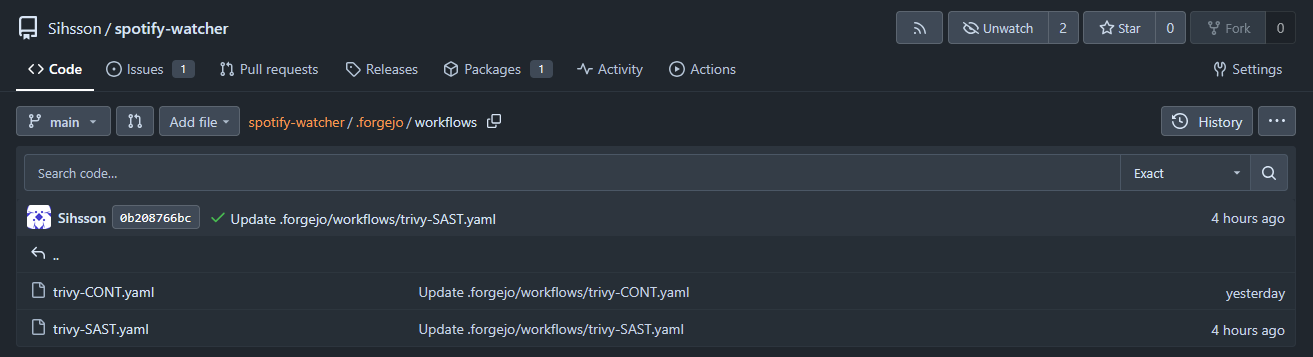
Ok, first thing first: create a repo. Here is a dummy repo with some vibe-coded application that I use to record my Spotify listening history. This will be my example repository. All code is available.
 Sihsson
You will want to create two Forgejo Actions, one for container images running only when a new image is pushed / updated trivy-CONT.yaml. Another one for the repository scan whenever a push / pull request is made trivy-SAST.yaml. These files will need to be located at : <your-repo-root-folder>/.forgejo/workflows/.
Here is the YAML code for container image scan:
name: Security Scan of spotify-watcher:latest Docker Image

on:
  workflow_dispatch: # You can manually trigger the action...
  schedule:
    - cron: '20 21 * * 0' # Weekly scans 21h20 on Sundays
  registry_package: # When the image changes
    types: [published, updated]

jobs:
  trivy-scan:
    runs-on: ubuntu-latest # Label of the Forgejo Runner
    container:
      image: aquasec/trivy:latest
    steps:
      - name: Scan Container Image
        run: | # Change the image name to your liking...
          trivy image \
            --severity HIGH,CRITICAL \
            --exit-code 1 \
            --format table \
            --ignore-unfixed \
            forgejo.valentinvie.fr/sihsson/spotify-watcher:latest
Here is the YAML code for the repository scan. I had a few issues with scanning my own Forgejo URL. I think this is becaue the trivy repo <URL> command is supposed to work with GitHub or GitLab but not with Forgejo. To change that I copy the repo within Trivy container running inside the DinD container and scan the files.
name: Repository Static Security Scan (SAST)

on:
  workflow_dispatch:
  push:
    branches: [main]
  schedule:
    - cron: '10 21 * * 0' # Weekly scan 21h10 Sundays

jobs:
  trivy-scan:
    runs-on: ubuntu-latest # Label of the Forgejo Runner
    container:
      image: aquasec/trivy:latest
      options: --entrypoint ""
    steps:
      - name: Manual Source Checkout
        run: |
          apk add --no-cache git
          git clone https://x-access-token:${{ secrets.GITHUB_TOKEN }}@forgejo.valentinvie.fr/${{ forge.repository }} $GITHUB_WORKSPACE
          ls -la $GITHUB_WORKSPACE

      - name: Run Trivy SAST
        run: |
          trivy repo $GITHUB_WORKSPACE \
            --severity HIGH,CRITICAL \
            --exit-code 1 \
            --scanners vuln,secret,misconfig \
            --format table
Forgejo Actions is designed to be a drop-in replacement for GitHub Actions. Because almost every existing Action (like checkout) expects a variable called GITHUB_TOKEN to exist, Forgejo automatically generates one for every job.
Keep in mind, all action steps are executed with the FORGEJO_TOKEN and GITHUB_TOKEN environment variables; interacting with untrusted code in the pull request may leak these tokens (source). That is to be expected: you need to give your Forgejo Actions access to your code, if your repository is private you need to give them a *_TOKEN.
Running a Trivy Scan
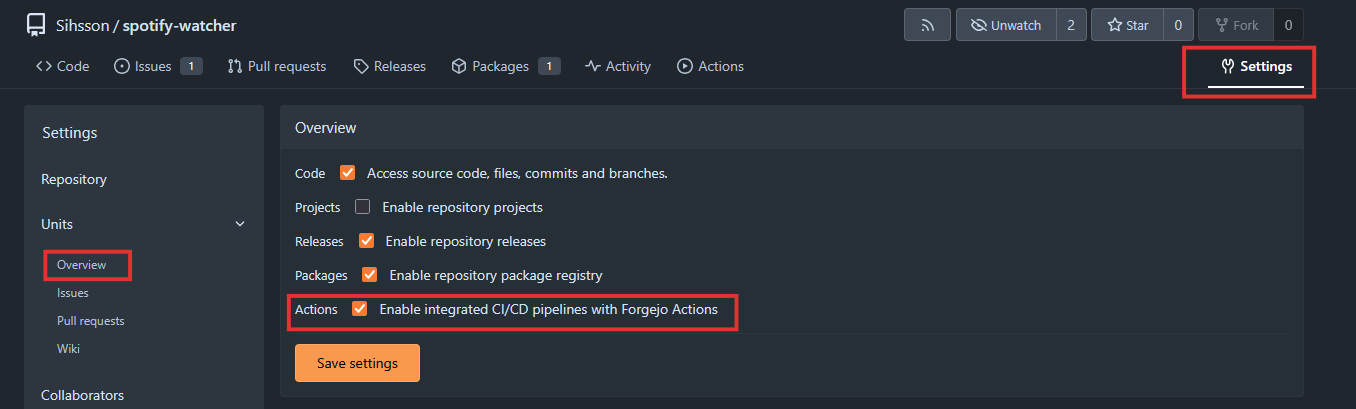
If you don't have the action tab on top of your screen, just activate it in the repo :
Now you can navigate to the Actions tab and manually run a workflow :
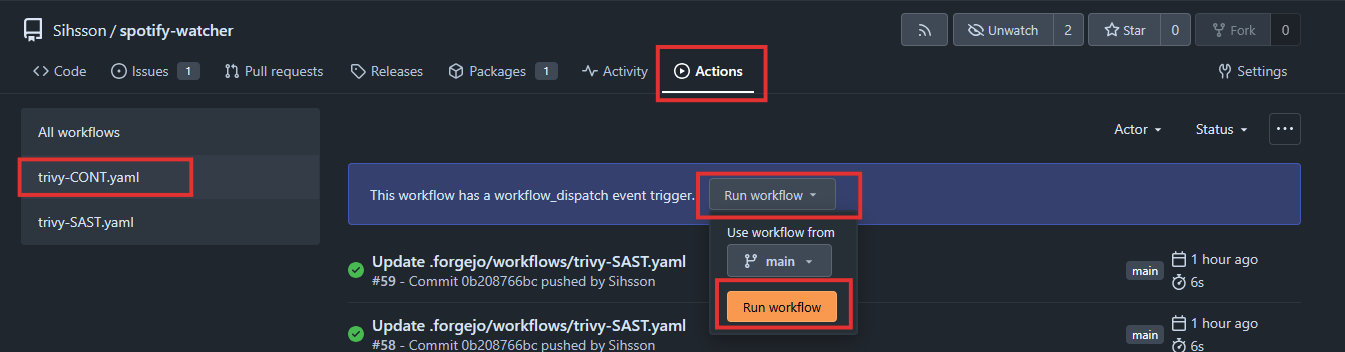
You should see this kind of reports reminding you security issues can affect the best of us... That is the moment you realize you don't apply the security recommendations you expect others to resolve.
2026-02-10T14:48:42Z	INFO	[vuln] Vulnerability scanning is enabled
2026-02-10T14:48:42Z	INFO	[misconfig] Misconfiguration scanning is enabled
2026-02-10T14:48:42Z	INFO	[checks-client] Need to update the checks bundle
2026-02-10T14:48:42Z	INFO	[checks-client] Downloading the checks bundle...
235.65 KiB / 235.65 KiB [------------------------------------------------------] 100.00% ? p/s 100ms2026-02-10T14:48:43Z	INFO	[secret] Secret scanning is enabled
2026-02-10T14:48:43Z	INFO	[secret] If your scanning is slow, please try '--scanners vuln,misconfig' to disable secret scanning
2026-02-10T14:48:43Z	INFO	[secret] Please see https://trivy.dev/docs/v0.69/guide/scanner/secret#recommendation for faster secret detection
2026-02-10T14:48:43Z	WARN	[pip] Unable to find python `site-packages` directory. License detection is skipped.	err="unable to find path to Python executable"
2026-02-10T14:48:43Z	INFO	Number of language-specific files	num=1
2026-02-10T14:48:43Z	INFO	[pip] Detecting vulnerabilities...
2026-02-10T14:48:43Z	INFO	Detected config files	num=1
Report Summary
┌──────────────────┬────────────┬─────────────────┬─────────┬───────────────────┐
│      Target      │    Type    │ Vulnerabilities │ Secrets │ Misconfigurations │
├──────────────────┼────────────┼─────────────────┼─────────┼───────────────────┤
│ requirements.txt │    pip     │        0        │    -    │         -         │
├──────────────────┼────────────┼─────────────────┼─────────┼───────────────────┤
│ Dockerfile       │ dockerfile │        -        │    -    │         1         │
└──────────────────┴────────────┴─────────────────┴─────────┴───────────────────┘
Legend:
- '-': Not scanned
- '0': Clean (no security findings detected)
Dockerfile (dockerfile)
=======================
Tests: 20 (SUCCESSES: 19, FAILURES: 1)
Failures: 1 (HIGH: 1, CRITICAL: 0)
DS-0002 (HIGH): Specify at least 1 USER command in Dockerfile with non-root user as argument
════════════════════════════════════════
Running containers with 'root' user can lead to a container escape situation. It is a best practice to run containers as non-root users, which can be done by adding a 'USER' statement to the Dockerfile.
See https://avd.aquasec.com/misconfig/ds-0002
────────────────────────────────────────
⚙️ [runner]: exitcode '1': failure
Container scanning logs
Surprisingly, the AI did not code with vulnerable libraries after all.
2026-02-11T13:59:48Z	INFO	[vuln] Vulnerability scanning is enabled
2026-02-11T13:59:48Z	INFO	[misconfig] Misconfiguration scanning is enabled
2026-02-11T13:59:48Z	INFO	[checks-client] Need to update the checks bundle
2026-02-11T13:59:48Z	INFO	[checks-client] Downloading the checks bundle...
235.65 KiB / 235.65 KiB [------------------------------------------------------] 100.00% ? p/s 100ms2026-02-11T13:59:49Z	INFO	[secret] Secret scanning is enabled
2026-02-11T13:59:49Z	INFO	[secret] If your scanning is slow, please try '--scanners vuln,misconfig' to disable secret scanning
2026-02-11T13:59:49Z	INFO	[secret] Please see https://trivy.dev/docs/v0.69/guide/scanner/secret#recommendation for faster secret detection
2026-02-11T13:59:49Z	WARN	[pip] Unable to find python `site-packages` directory. License detection is skipped.	err="unable to find path to Python executable"
2026-02-11T13:59:49Z	INFO	Number of language-specific files	num=1
2026-02-11T13:59:49Z	INFO	[pip] Detecting vulnerabilities...
2026-02-11T13:59:49Z	INFO	Detected config files	num=1
Report Summary
┌──────────────────┬────────────┬─────────────────┬─────────┬───────────────────┐
│      Target      │    Type    │ Vulnerabilities │ Secrets │ Misconfigurations │
├──────────────────┼────────────┼─────────────────┼─────────┼───────────────────┤
│ requirements.txt │    pip     │        0        │    -    │         -         │
├──────────────────┼────────────┼─────────────────┼─────────┼───────────────────┤
│ Dockerfile       │ dockerfile │        -        │    -    │         0         │
└──────────────────┴────────────┴─────────────────┴─────────┴───────────────────┘
Legend:
- '-': Not scanned
- '0': Clean (no security findings detected)
Repository scanning logs
As reminded above, Trivy is not a full-featured SAST scanner. It is unlikely to detect issues with code quality, like function reuse, or input sanitization issues...
My entirely vibe-coded AI containers could still be vulnerable ! Who could have guessed ? ...