How CrowdSec Works: Following a Request Through the WAF
Anything you expose to the internet gets scanned within minutes: bots probing for /wp-login.php, .env files, and the latest CVE in whatever app you run. A firewall alone will not stop them, because to a firewall those requests look like perfectly normal HTTPS traffic. This post explains why a web application firewall (WAF) is worth having and what makes CrowdSec different from a classic WAF.
Why setup a WAF in front of your apps?
A basic firewall works on IP addresses and ports. It can decide to whom port 443 is open, but it cannot set conditions on the content of the request. A WAF sits behind the reverse proxy, once TLS is terminated, and can analyze the content of a request. That buys you three things:
- Generic attack detection: injection, XSS, traversal and other well-known patterns are blocked before they reach the application.
- Virtual patching: when a vulnerability is published for an app you host, a WAF rule can block its exploit while you wait for (or test) the upstream fix.
- Noise reduction: scanners and bots are rejected early instead of filling your application logs.
What makes CrowdSec different
A classic WAF judges every request in isolation, against a set of signatures. It has no memory of who sent the request and no idea what that IP did elsewhere. CrowdSec adds two things on top of request inspection.
It remembers behaviour, not just requests
Besides per-request rules, CrowdSec reads your logs and runs scenarios over them, using leaky buckets. Each matching event adds to a bucket for that IP, and when the bucket overflows, an alert is raised. That catches behavior of an attacker that no single request reveals. For example slow credential stuffing, 404 scanning, or a crawler can be found that way.
The crowd does part of the work
When your instance of CrowdSec bans an IP, it can share that signal (the IP, the scenario, a timestamp) with the CrowdSec Central API. Signals from all participating instances are aggregated into the Community Blocklist, which your LAPI downloads in return. IPs that attacked other people are blocked on your side before they ever send you a request. Additional blocklists can be subscribed to from the CrowdSec Console and Hub, this is actually how CrowdSec gets business revenue.
All of this runs on your own machines: unlike a cloud WAF like Cloudflare or Akamaï, the traffic is never routed through a third party. No subscription needed which is quite nice in this economy !
The life of a request
The diagram below shows how an incoming HTTP request travels through CrowdSec: the remediation component, centralized allowlists, AppSec (in-band and out-of-band rules, bot detection), the behavioral engine, the SaaS blocklists, and every whitelist layer along the way. Parser stages are not shown below, see the parser documentation for those.
The diagram works when CrowdSec is setup with a reverse-proxy, with a firewall it is a bit different.
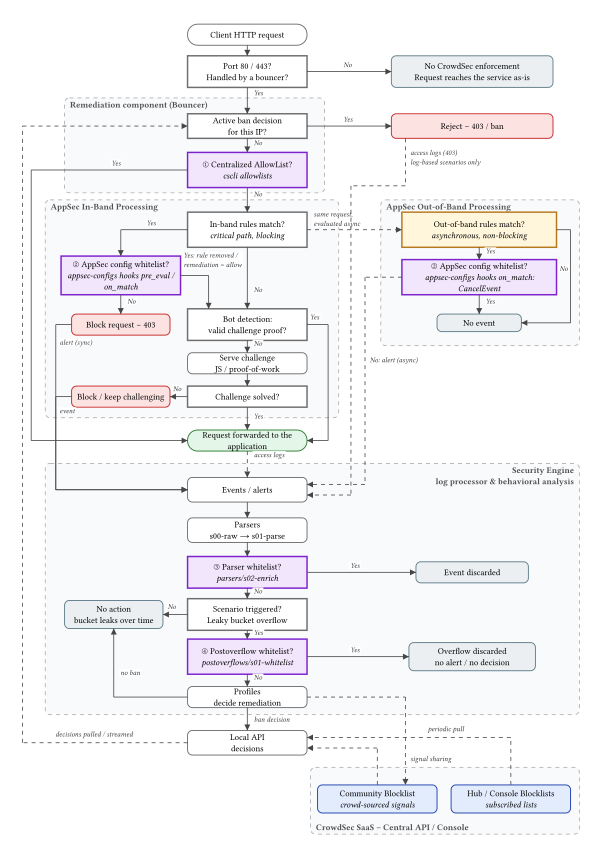
- ━━ Solid arrow: synchronous path (the client waits)
- ┅┅ Dotted arrow: asynchronous path (off the critical path)
- Red: request rejected
- Green: request reaches the application
- Yellow: out-of-band processing (alerts only, never blocks)
- Blue: blocklists from the CrowdSec SaaS (Central API / Console / Hub)
- Purple ①–④: whitelist / allowlist layers
The four whitelist layers
CrowdSec lets you exempt traffic at four different points, and they do not have the same effect. See the whitelist documentation for the full reference.
The bouncer skips AppSec for the IP, and the LAPI refuses to create decisions for it.
In-band: removes a rule or forces allow, so nothing is blocked. Out-of-band: cancels the event (hooks).
The event is dropped before reaching scenarios, so buckets are never filled. It can prevent a ban, but cannot whitelist an in-band AppSec match.
The overflow is discarded, so no decision applied. Suited to costly checks such as reverse DNS (postoverflow docs).
Having a hard time choosing between a parser and a postoverflow whitelist?
- Parser whitelists (
/etc/crowdsec/parsers/s02-enrich/) run on every event. Matching events never reach a scenario, so they can never contribute to an alert. Keep the expression precise and cheap, since it is evaluated for each log line. - Postoverflow whitelists (
/etc/crowdsec/postoverflows/s01-whitelist/) only run when a bucket overflows. The events still go through the scenarios, but the resulting bucket overflow is dropped before it becomes a decision. Because they run rarely, they are the right place for expensive checks like reverse DNS lookups.
Default whitelists
Out of the box, CrowdSec ships a parser whitelist for private IPv4 and IPv6 ranges in /etc/crowdsec/parsers/s02-enrich/whitelists.yaml, so your instance cannot ban itself or LAN IP.
By default, CrowdSec also ships with default postoverflow whitelists for good bots. Google crawler and other "good" bots are whitelisted. You still get alerts from these requests but the IP will not be banned. See the default collection Web Crawlers - Whitelist.
Things to know before setting up CrowdSec :
- SaaS blocklists: CrowdSec periodically pulls the Community Blocklist (built from signals shared by all CrowdSec instances) and the blocklists subscribed from the Hub or Console. These blocklists are pulled from the CAPI (Central API). They become regular decisions, so the bouncer rejects those IPs before they ever reach AppSec. Local alerts are shared back to the Central API (signal sharing).
- Unprotected ports: traffic on a port not handled by a bouncer (remediation component) is never inspected by CrowdSec at request time. A reverse-proxy usually only handle ports
80and443. If you have port22open on your server (bad idea) and the reverse-proxy (ex : Traefik) is not handling it, CrowdSec remediation component will not protect you. A proper CrowdSec + firewall integration is required for that (ex : OPNSense). - Behavioural decision: events fill leaky buckets; when a scenario overflows (and passes the postoverflow whitelist), profiles decide whether to issue a ban, which the bouncer then enforces on the next requests (see next bullet point !). Once the ban is enforced, the rejected requests are still written to the proxy access log (status 403), so log-based scenarios (
http-probing,http-bad-user-agent,http-cve…) can still overflow and create a new alert and decisions. These additional decisions can extend the ban duration. - Ban check: the bouncer keeps a local copy of the LAPI (Local API) decisions (stream or live mode), so a banned IP is rejected before AppSec (in-band and out-of-band). There can be a small configurable delay before a ban is effective in stream mode.
- Centralized allowlists: allowlisted IPs skip AppSec entirely (docs).
- In-band rules: evaluated on the critical path; a match blocks the request and raises an alert immediately (docs). An alert does not mean an IP ban, only a decision from a scenario can raise an IP ban.
- Out-of-band rules: evaluated asynchronously; they never block, but produce alerts and events that feed scenarios which then turn into IP when buckets overflow (docs).
- Bot detection: AppSec can answer with a challenge instead of forwarding the request (docs). A JavaScript challenge is served to requests without a proper cookie. When an IP has requested too many challenges without solving one, this triggers a decision and an IP ban.
Final note
A classic WAF is a bouncer with a list of banned outfits; CrowdSec is a bouncer who also remembers faces, compares notes with every other bouncer in town, and calls the whole street when someone starts trouble.
Leave the defaults on for a few days, grab some popcorn, and watch cscli alerts list fill up with people who tried their luck. I'll soon post a new article with proper hardening steps and configuration changes you may want to follow.